A good job application form does two jobs at once: it makes applying easy enough that strong candidates actually finish, and it collects what you need to screen them fairly. Get it wrong and you either scare off good people with a fifteen-minute form, or you collect so little you can't tell applicants apart. This guide covers what a job application form should include, a five-step build with resume upload, the questions you legally can't ask, and where the applications go once they're in.
What Is a Job Application Form, and What Should It Include
A job application form is a structured form candidates fill out to apply for a role: their contact details, the position they want, their relevant experience and education, usually a resume upload, and any screening questions specific to the job. Its purpose is to collect consistent, comparable information from every applicant, so you can evaluate people on the same basis instead of wrangling a pile of differently-formatted emails.
That consistency is the real value. When every candidate answers the same questions and uploads a resume the same way, screening gets faster and fairer, you're comparing like with like. A good application form is also short enough that qualified people don't abandon it: the goal is the information you need to make a first-round decision, not a complete employment history nobody reads at the application stage.
What it should include depends on the role, but the shape is consistent: who they are and how to reach them, what they're applying for, enough background to screen on (a resume plus a few key fields), and a couple of job-specific screening questions. Everything else, references, detailed history, assessments, belongs later in the process, not on the first form. The whole point of a hosted, embeddable application is to make that first step frictionless.
Two practical realities shape a good application form. First, a lot of candidates apply from a phone, often on a break or a commute, so a form that's painful on mobile loses exactly the motivated people who applied the moment they saw the role. Second, strong candidates usually have options and the least patience for a bloated process, so every unnecessary field is a small tax your best applicants are the most likely to refuse to pay. Short and mobile-friendly isn't a nicety here; it's how you avoid filtering out the people you most want.
The Fields a Good Job Application Form Needs
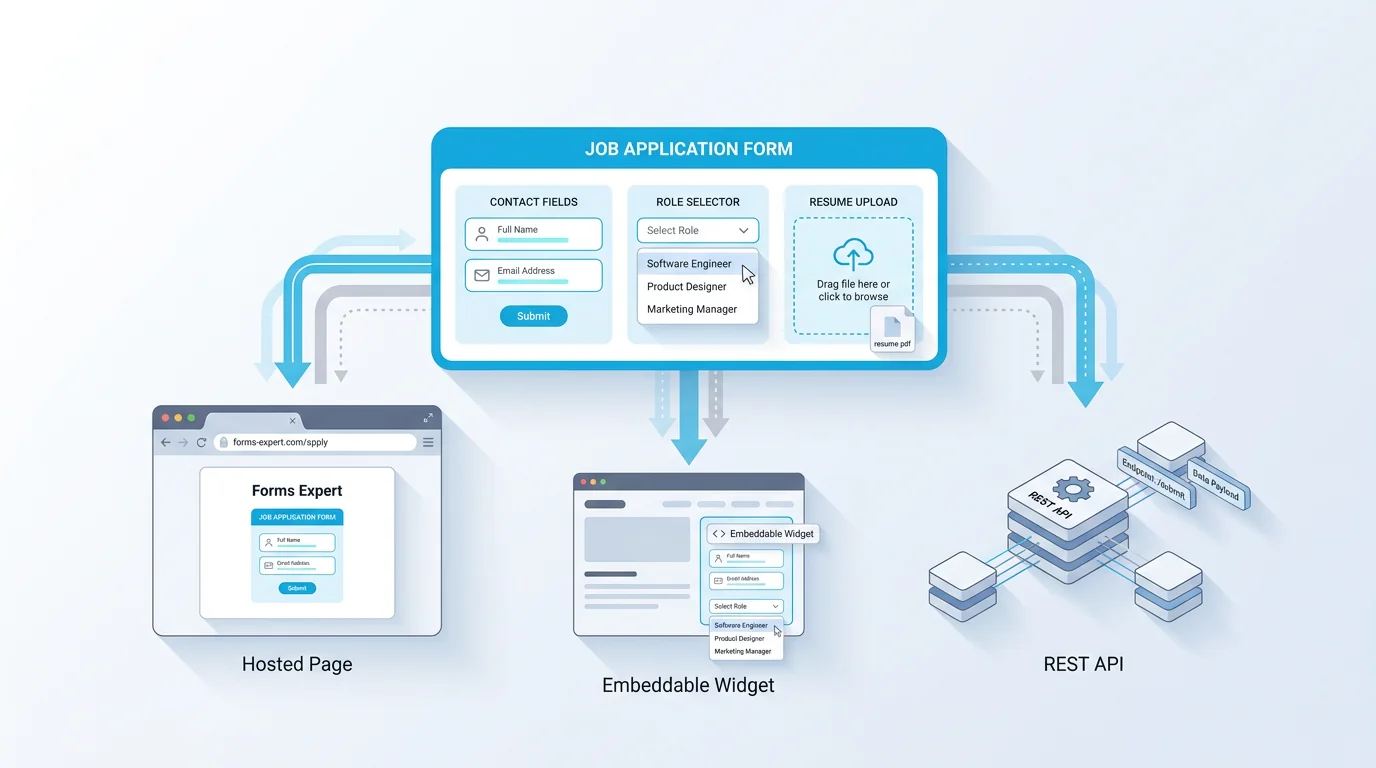
Group the fields into three steps so a longer form feels manageable: personal details, background, and additional details with consent. The table lays out the usual ones.
The personal step is the basics: full name, email and phone, and the role being applied for. The background step is where most of the signal is, a resume or CV upload, plus a few structured fields like recent work experience and education so you have searchable data, not only a PDF. The additional step covers job-specific screening (work authorization, availability, willingness to relocate) and a consent or declaration that the information is accurate and can be processed. Keep each step tight: the more a form sprawls, the more good candidates quit partway through, which is exactly who you can least afford to lose.
A balance worth getting right is structured fields versus the resume. The resume carries the full story, but it's a PDF you can't sort or search, so a few structured fields (current role, years of experience, location, the one must-have skill) give you data you can actually filter on. Don't duplicate the whole resume in form fields, though, asking someone to retype their history after uploading it is the fastest way to lose them. Capture the handful of fields you'll screen on, and let the resume carry the rest.
One screening question worth its weight is a simple knockout: a yes/no on a hard requirement like work authorization or a required certification. Putting it early lets you filter the clearly-ineligible without reading every resume, as long as the question is genuinely job-related and not a backdoor to a protected characteristic.
| Field | What it captures | Step |
|---|---|---|
| Full name + contact | Who's applying and how to reach them | Personal |
| Role applied for | Which position | Personal |
| Resume / CV upload | Their full background in one file | Background |
| Work experience | Recent roles and dates | Background |
| Education | Relevant qualifications | Background |
| Screening questions | Eligibility: work authorization, availability | Additional |
| Consent / declaration | Permission to process the application | Additional |
How to Create a Job Application Form in 5 Steps
With the fields decided, the build is quick. Five steps cover it.
1. Start from a template. Beginning with a job application template saves you the structural decisions and gives you a field set you trim rather than build from scratch.
2. Add a required resume upload. Add a file field for the resume or CV, make it required, and the next section covers doing this cleanly. A resume is usually the single most useful thing on the form.
3. Add screening questions. Include the two or three job-specific questions that let you filter, work authorization, availability, a key skill, so first-round screening is fast. Resist turning these into a full assessment; that comes later.
4. Set routing to your hiring workflow. Decide where applications go: your inbox, a team chat, or your own system. With every published form also exposing a REST API, you can route applications into the tools your team already uses, the next-to-last section covers this.
5. Publish it. Ship the form as an embed on your careers page, a hosted link to share in a posting, or both. In Forms Expert the same form is a careers-page embed, a hosted link, and an API at once, and building it works on every plan, including Free. Candidates apply without creating an account, which keeps your completion rate up.
A sixth habit closes the loop: send an acknowledgement. An automatic email confirming the application arrived, ideally setting expectations for next steps, costs nothing and noticeably improves how candidates feel about your company, even the ones you don't hire. Application black holes are a common complaint, and a one-line confirmation puts you ahead of most employers on candidate experience.
How to Accept Resume Uploads
A resume upload is the heart of most application forms, and getting it right removes a lot of friction for candidates.
Add a file field, make it required so no application arrives without a resume, and set validation for the file types and size you'll accept, PDF and common document formats, capped at a sensible size. The validation matters: it stops the wrong file type or an enormous upload before it becomes a problem, and it tells the candidate immediately rather than after they've submitted. Crucially, applicants upload their resume without creating an account or logging in, which is one of the biggest sources of drop-off on clunky application systems. They pick the file, it validates, they submit.
One honest boundary to be clear about: uploaded resumes are accepted and stored, but they are not virus-scanned. The form's protections are against spam and abuse, a hidden honeypot field, rate limiting, and an optional CAPTCHA, which is a different thing from scanning a file's contents for malware. So whoever opens applicant files should apply the normal caution you'd use for any attachment from an unknown sender. It's a small distinction, but on a public form that anyone can submit to, it's worth stating plainly rather than letting people assume a protection that isn't there.
A couple of practical touches help. Accept the formats people actually use, PDF first, plus common document types, and state the accepted types and the size cap on the field so candidates aren't guessing. If the role benefits from a portfolio or work samples, add a second optional upload rather than forcing everything into one file. And keep the upload required only where it should be: for most roles a resume is essential, but for a quick expression-of-interest form, making it optional can widen your pool.
It's also worth thinking about accessibility. Some applicants use assistive technology, so a clearly labeled upload field and a form that works with a keyboard aren't just nice to have, they keep you from accidentally screening out capable people before they've even applied.
What You Can and Can't Ask
This is the part template galleries skip, and it's the part that can actually get you in trouble. In the US, the EEOC prohibits hiring decisions based on protected characteristics, and asking about them on an application form invites exactly that suspicion. As general guidance, avoid questions that reveal:
- Age or date of birth (beyond confirming someone is old enough to work)
- Race, color, or ethnicity
- Religion
- National origin or ancestry
- Sex, gender identity, or sexual orientation
- Disability, health conditions, or medical history
- Marital or family status, pregnancy, or children
- Genetic information
There are also state-level rules that catch people out. A growing number of states bar asking for salary history, and many have ban-the-box laws restricting when and whether you can ask about criminal convictions. These vary widely by location, so a form that's fine in one state can be a problem in another. The EEOC's overview of prohibited employment practices and its pre-employment inquiry guidance are the place to start, and a qualified HR or employment-law professional can cover the specifics for your situation. Stick to what's relevant to the job, the skills, experience, and eligibility to do the work, and you'll stay on the right side of the line for most roles.
There's an upside to this discipline beyond staying legal: consistency. When you ask every candidate the same job-relevant questions and skip the personal ones, you're not only avoiding discrimination claims, you're building a fairer, more comparable process. Structured, identical questions make it easier to evaluate people on merit and harder for unconscious bias to creep in. The legal floor and the good-hiring ceiling point the same direction: ask about the work, consistently, and nothing else. If you hire across multiple states or countries, the safest default is to design one form around the strictest rules you're subject to, rather than maintaining a different version for each place. A single conservative form is far easier to keep compliant than several you have to track.
Where Applications Go and How to Route Them
An application form is only useful if the applications reach the people doing the hiring, fast and in a usable shape. Good form tools route submissions for you instead of leaving them in one dashboard to check manually.
With Forms Expert, each application can be delivered several ways at once. Applications land in the dashboard by default, and you can also have each one sent to email, pushed to Telegram for a hiring team that works in chat, or delivered to your own system through a signed webhook that retries if your endpoint is briefly down. Developers can pull applications through the REST API.
A precise word on the ATS question, because it's easy to overclaim. Forms Expert doesn't have a native, one-click integration with applicant tracking systems. What it has is those routing outputs, email, Telegram, signed webhooks, and the API, which you use to get applications into your ATS or hiring workflow. For many teams a webhook into their system, or the API, is exactly how that connection gets made; it's just worth being clear that it's via those outputs rather than a prebuilt ATS connector. Set the routing once, and every application after that follows the same path automatically.
Speed is the quiet benefit. When applications route to where your team already works the instant they're submitted, the gap between a candidate applying and someone reviewing them shrinks, which matters because strong candidates move fast and the first employer to respond often wins. A form that drops applications into an inbox nobody checks until Friday is how good people slip away to a competitor who replied on Tuesday.
On reading the applications: a basic results overview, enough to see and sort what's come in, is on every plan, while the deeper per-field analytics are part of Pro. For most hiring, that overview plus your routing is all you need. And keep applicant data only as long as you need it for hiring. Holding applications indefinitely isn't just untidy, in some places it's a compliance issue, so set a retention practice and stick to it.
Start From a Free Job Application Template
You don't have to build from a blank page. Forms Expert has a ready job application form template with the standard fields and a resume upload already in place, which you edit to match the role. The wider HR template category has related starting points for other people-operations forms.
Templates are free to use on every plan. Application volume depends on your tier, so pick the plan that matches your hiring, but starting from a template isn't gated, and there's no "unlimited" framing, just clear per-tier limits. Edit the template, set your screening questions, decide where applications route, and publish as a careers-page embed or a hosted link.
The recap: keep the form short enough that good candidates finish, require a resume, ask only job-relevant questions (steering clear of the protected categories above), and route applications to your team automatically. For related people-operations forms, our registration form guide and client intake form guide cover adjacent patterns. Start from the template or the home page and open applications today, just check your local employment law first.
And treat the first version as a draft you refine. Launch a lean form, watch where candidates drop off or which fields go unanswered, and adjust. An application form you tune from real applicant behavior beats one you over-engineer before a single person has applied.
The best application form is the one candidates actually finish and your team actually acts on. Everything else, the perfect field set, the ideal length, is secondary to those two outcomes.
Frequently Asked Questions
The essentials and not much more. Include contact details (name, email, phone), the role being applied for, a resume or CV upload, a few structured background fields like recent experience and education, and two or three job-specific screening questions such as work authorization and availability. Add a consent or declaration that the information is accurate. Keep it short enough that strong candidates finish it, and save references, detailed history, and assessments for later stages. Critically, stick to questions relevant to doing the job, and avoid anything touching protected characteristics like age, race, religion, or marital status.