The difference between a smooth client kickoff and a frustrating one often comes down to a single form. A good client intake form gathers everything you need to start work, the scope, the goals, the contact details, the budget, before the first meeting, so you walk in prepared instead of spending that call collecting basics. This guide covers what a client intake form is, exactly what to include, the fields each profession adds, a five-step build, and where to start with a free template.
What Is a Client Intake Form
A client intake form is a structured form a new client fills out before you start working together, capturing the information you need to onboard them: who they are, what they want, the scope of the work, and the practical details like budget and timeline. It's the bridge between someone saying yes and the work actually beginning.
The timing is the key to its value. A client intake form is sent early in the relationship, typically right after someone agrees to work with you and before the first real meeting or kickoff. Done that way, it front-loads the boring-but-essential information gathering, so your first conversation is about strategy and fit rather than spelling and phone numbers. Coaches, consultants, agencies, accountants, lawyers, clinics, and salons all use some version of it, because every one of them has the same problem: a new client arrives with information in their head that you need in a usable, consistent form.
The other quiet benefit is consistency. When every client answers the same intake questions, you build a comparable record across your whole client base, and you stop forgetting to ask the one thing that always bites you later. A good intake form is part organization, part professionalism: it signals to a new client that you've done this before and have a process, which is reassuring at exactly the moment they're deciding whether they trust you.
It's worth naming the cost of not having one. Without an intake form, the same information gets collected ad hoc, a detail in an email, a number scribbled on a call, a scope half-remembered, and the gaps surface at the worst moments: a missed deadline nobody captured, a billing dispute because the terms were never confirmed, a kickoff that stalls while you chase basics. A client intake form trades five minutes of the client's time up front for hours you'd otherwise lose to back-and-forth later.
What to Include on a Client Intake Form
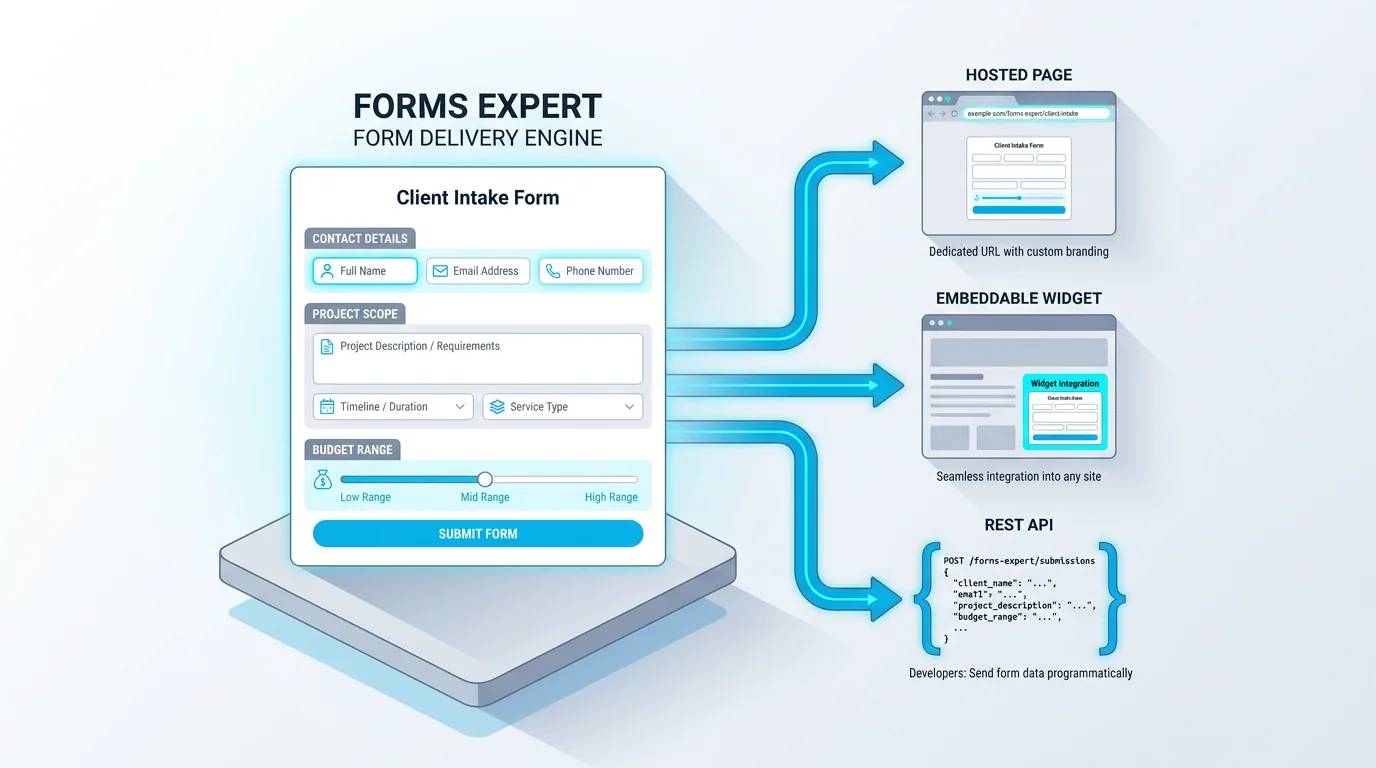
The contents vary by what you do, but a strong client intake form almost always covers the same core ground. Use this as your starting list and trim to fit:
- Contact details: name, email, phone, and business or organization
- The service or project they want from you
- Scope and goals: what they're trying to achieve, and what success looks like
- Budget and timeline, even as a rough range
- How they found you (useful for knowing which marketing works)
- Billing details for invoicing, kept separate from any card processing
- Consent or agreement to your terms and to how you'll handle their data
The principle is the same one that governs every good form: ask for what you'll actually use, and nothing more. It's tempting to gather everything up front while the client is motivated, but a thirty-field intake form is how you turn an eager new client into one who quietly procrastinates. Capture what you need to start, and leave the deeper details for when work is underway and the relationship is established. If your intake includes a consent or agreement step, our guide to creating a consent form covers how to word and capture it cleanly.
A small structural tip: mark clearly which fields are required and which are optional. Some intake details are nice-to-have, and forcing a made-up answer is worse than an empty field. Require the handful you genuinely can't start without, the scope, the contact, the agreement, and let the rest be optional, so a client isn't blocked by a question that doesn't apply to them.
Think of the intake form as the first artifact of your working relationship. It's often the first thing a client does after hiring you, so the experience, clear, quick, professional, sets the tone for everything that follows. A clunky, exhausting intake quietly signals that working with you will be clunky and exhausting; a clean one signals the opposite. That framing helps you resist over-collecting, since every field is a small message about what your process is like.
Client Intake Form Fields by Profession
On top of the common core, each profession has its own must-have fields. The table shows what different fields a few common ones tend to add.
The pattern to notice is that the extra fields all map to the first decision you'll make for that client. An agency needs scope and decision-makers because that shapes the proposal; an accountant needs the entity type and prior-year details because that shapes the engagement; a coach needs goals and current situation because that shapes the first session. Start from your own first decision and work backward to the fields that inform it, and you'll end up with an intake form that's genuinely useful rather than generically thorough.
The regulated professions need the most care here. Legal intake, for instance, has to capture conflict-check details before you can take a matter on, which is why bar associations and defense organizations publish sample intake forms, the NACDL's sample client intake form is one reference point, so nothing essential gets missed. Healthcare and financial intake carry similar obligations. If you're in a regulated field, model your intake on your profession's accepted templates rather than a generic one, and verify it against the rules you operate under.
| Profession | What the intake adds |
|---|---|
| Coaching / consulting | Goals, current situation, what success looks like, commitment |
| Agency / creative | Project scope, brand assets, deadlines, budget range, decision-makers |
| Accounting / bookkeeping | Entity type, prior-year details, software in use, services needed |
| Legal | Matter type, parties involved, key dates, conflict-check details |
| Wellness / fitness | Goals, relevant history, availability, notes handled with care |
| Salon / esthetics | Service wanted, preferences, allergies or sensitivities |
How to Build a Client Intake Form in 5 Steps
Once you know your fields, building the form is quick. Five steps cover it.
1. Start from a template. Beginning with an existing intake template gives you a structured multi-step form to trim, rather than a blank page to fill.
2. Adjust the fields to your work. Keep the common core (contact, service, scope, budget) and swap in the profession-specific fields from the section above. Cut anything you won't use to onboard.
3. Split a long intake into steps. If you genuinely need a lot of detail, break it into a multi-step form so it feels manageable. For longer intakes where clients may need to gather information, save-and-continue lets them finish later, and it's available on the Starter plan and up rather than Free.
4. Add a consent step. Include an explicit agreement to your terms and to how you'll handle their data, especially if your work touches anything sensitive. A required checkbox plus a clear statement does the job.
5. Publish it. Ship the intake form as a hosted link to send after someone signs on, an embed on your onboarding page, or via the API. In Forms Expert the same form is all three at once, and building it works on every plan, including Free. Clients fill it out without creating an account, which keeps completion high.
A worthwhile sixth habit is to confirm receipt. An automatic acknowledgement, letting the client know their intake came through and what happens next, costs nothing and reinforces the professional first impression the form is there to create. It also gives them a moment to flag anything they entered wrong.
Client Intake Form Best Practices
A few habits separate an intake form clients complete from one they put off. None of them are complicated.
Keep it short and ask only what you'll use. This is the single biggest lever: a focused intake form that takes five minutes gets returned promptly, while a sprawling one sits in an inbox for a week and delays your start. Send it at the right moment, right after someone agrees to work with you and before the first meeting, so the information is ready when you need it and the client is still in the momentum of saying yes. Group related questions so the form reads in clear sections, contact, then project, then logistics, rather than as a random pile.
Use the right field types so answers come back clean: a dropdown for service type, a number or range for budget, a date for timelines. And for longer intakes, lean on save-and-continue (a Starter-plan feature) so a client who needs to dig up a detail can come back rather than abandoning the form. The goal throughout is to make the intake feel like a professional, frictionless first step, because it's often a client's first real experience of working with you, and first impressions of your process stick.
There's research behind the keep-it-short rule. Nielsen Norman Group's work on web form design consistently finds that completion drops as forms get longer and that clear labels and grouping reduce errors, both of which apply directly to intake. The same study-backed advice that helps a checkout helps an intake form: fewer fields, plain labels, logical order. Treat the intake form as a piece of your client experience to refine, not a static document, and revisit it whenever a question consistently confuses people or one you never actually use.
It also pays to test the form on yourself before sending it to a real client. Fill it out as if you were the client, on a phone, and you'll catch the awkward question, the field that should be optional, or the section that drags. Thirty seconds of self-testing saves a client the friction and saves you the corrected resubmission. And once it's working, automate what happens next: route each completed intake to wherever you'll act on it, and trigger your kickoff step from there. The less manual handling between a client finishing the form and you starting the work, the faster and more polished the onboarding feels.
Client Intake Form Examples and Templates
The fastest way to a good intake form is to start from an example and adapt it, rather than designing from scratch. A solid model is a short, multi-step form: contact details on the first step, the project or service on the second, logistics and consent on the third, so the client moves through it in digestible chunks.
Forms Expert's patient intake form template is the closest ready example, a multi-step intake that includes a consent step, and while it's framed for a patient context, the structure (staged questions plus an agreement) adapts cleanly to coaching, agency, accounting, or legal intake. Browse the wider template gallery for other starting points you can reshape. One honest note: there isn't a dedicated client-intake template or a separate healthcare category in the gallery, so the patient-intake template is the multi-step example to adapt, not a profession-specific form for each field.
Whatever you start from, the value is in tailoring it. A template gives you the structure and saves the setup; your edits, the profession-specific fields, your wording, your scope questions, are what make it actually fit the clients you onboard.
One more practical note: keep a master version and adapt copies from it. As you take on different kinds of clients, you'll want slightly different intakes, a quick one for small projects, a fuller one for retainers, and branching from one well-built base beats maintaining several from scratch. Build the structure once, and let each variant be a trim of it. Versioning the form this way keeps your edits intentional too: when you change a question, you change it in the base and let the variants inherit it, rather than drifting into several inconsistent intakes.
Build Your Client Intake Form Free
Putting an intake form live takes minutes once the fields are decided. In Forms Expert you can build a multi-step client intake form with a consent step on any plan, including Free, send it as a hosted link, embed it on your onboarding page, or pull responses through the API into your own system. Clients complete it without an account, and you can route each submission to your email or a team chat so nothing gets missed.
Two honest notes worth stating plainly. An intake form collects details but doesn't process payments, so for billing you pair it with a separate payment tool rather than expecting the form to charge a card. And if your intake accepts file uploads, contracts, IDs, prior documents, those files are stored but not virus-scanned, with anti-abuse handled by a honeypot, rate limiting, and an optional CAPTCHA. Template access is free on every plan, with per-tier submission limits and no "unlimited" framing.
The recap: gather what you need to start and no more, send the form right after a client signs on, add a consent step, and route the responses to where you'll see them. For the adjacent onboarding patterns, our registration form guide and consent form guide pair well with this. Start from the intake template or the home page and onboard your next client cleanly. Treat the first version as a draft you refine from real onboarding: watch which fields clients skip or stumble on, and trim accordingly. An intake form tuned from actual clients beats one perfected in theory before anyone has filled it out.
Frequently Asked Questions
A client intake form is a structured form a new client fills out before you start working together, capturing what you need to onboard them: their contact details, the service or project they want, the scope and goals, and practical details like budget and timeline. It's typically sent right after someone agrees to work with you and before the first meeting, so your kickoff is about strategy rather than collecting basics. Coaches, agencies, accountants, lawyers, clinics, and salons all use a version of it, because each needs to turn the information in a new client's head into a consistent, usable record.