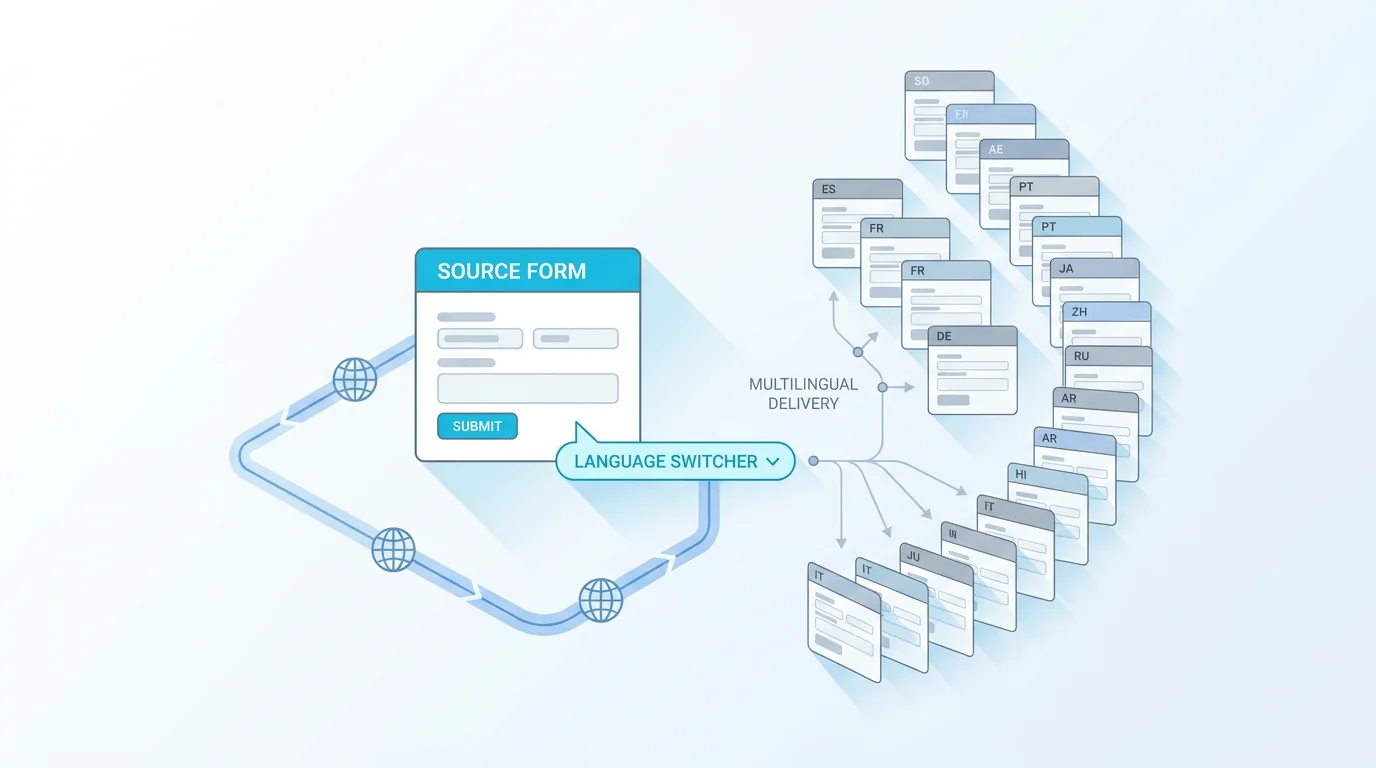
Forms Expert translates a single form definition into 30 languages through DeepL, in one action. There is no second toolchain to wire up: no exporting copy to a translation service, no pasting results back, and no separate form to maintain per language. A multilingual form builder should treat translation as one attribute of one form, and that is what this does.
Two Common Approaches, Both Expensive
Most teams approach localized forms one of two ways, and both are expensive in the long run.
- Duplicate the form per language. Now a single label change means editing it in every copy, and the copies drift apart the moment someone forgets one.
- Bolt on an external translation service, and you pay a second vendor, manage a second set of credentials, and own the glue code that shuttles strings back and forth.
Either way, the form definition stops being a single source of truth. Form translation works better as an attribute of one form than as a fleet of near-identical clones you maintain by hand.
How One-Click Translation Works
In Forms Expert, translation runs against the form you already built — its labels, help text, options, button copy, and validation messages. You pick the target languages and trigger the translation, and the platform sends the source strings to DeepL, the engine behind the feature, which returns up to 30 languages. The structure does not change: the same field schema, conditional logic, and consent settings apply to every language, because there is still only one form underneath. You are translating the content while the definition stays put. When you later edit the source copy, you re-translate the affected strings rather than rebuilding anything.
Per-Language Publish Control
Translation and publication are separate steps on purpose. A freshly translated language sits as a draft you can edit, so a reviewer can correct the DeepL output before any respondent sees it. Each language is then published on its own schedule: French and German can go live this week while Japanese waits for a native check next week. The source language keeps running the entire time. This is what keeps multilingual forms honest — nothing reaches the public until a human has decided it is ready, and an unfinished translation can never block the languages that are already good to go.
The Public Language Switcher
Once more than one language is published, you can optionally expose a language switcher on the hosted page and the embeddable widget. Respondents pick their own language, and the form re-renders in that locale while still writing back to the same underlying form. It is optional because not every deployment wants it — a campaign that already routes German traffic to a German page may prefer to skip the control and serve that language directly. Either way, every translation answers to one definition, so a submission in Polish lands in the same place as a submission in English, with the same validation and the same delivery.
Where Translation Fits the Product
Translation is one attribute of the form, so the surfaces you already rely on keep working in every language. The same form can ship as a hosted page at /h/{slug}, an auto-resizing embedded widget at /e/{slug}, and a REST endpoint — and the localized versions inherit all three. A programmatic submission goes to the same endpoint regardless of language:
Because the localized copies share one definition, your delivery and analytics stay unified too. Submissions still route to email, Telegram, and signed webhooks, and on the Pro plan and up the completion funnel, per-field stats, and NPS aggregate across languages instead of scattering across a dozen duplicate forms. A drop in Spanish completions, for instance, shows up in the same funnel as the English one rather than in a separate report you have to remember to open.
| Capability | Forms Expert | Duplicate-per-language | External translation vendor |
|---|---|---|---|
| Single source of truth | Yes — one definition | No — N copies drift | Partial — glue code in between |
| Translate in one action | Yes, via DeepL | No — manual per copy | No — export and re-import |
| Review before publish | Per-language drafts | Manual and ad hoc | Depends on the vendor |
| Unified analytics and delivery | Yes | No — split per copy | No — split per copy |
| Second vendor to manage | None | None | Yes |
Which Plan You Need
Thirty-language DeepL translation is a Business plan feature — it is not available on Free, Starter, or Pro, and it is not framed as a free add-on. Business sits at the top of flat, predictable pricing: Free at $0, Starter at $9, Pro at $29, and Business at $99 per month, billed monthly or yearly at ten times the monthly rate, which works out to two months free. Paid plans include a 14-day trial, so a team can confirm that one-click DeepL form translation fits their workflow before committing. The full breakdown of limits and what each tier unlocks lives on the pricing page.
Frequently Asked Questions
A form can be translated into up to 30 languages. Forms Expert sends the form's source strings — labels, help text, answer options, button copy, and validation messages — to DeepL, which returns translations for the languages you select. The form's structure is unchanged across every language: the same field schema, conditional logic, and consent settings apply, because all the translations share a single form definition rather than becoming separate copies. That shared definition is what keeps the experience consistent, so editing the source copy later means re-translating the affected strings rather than rebuilding anything. Thirty-language translation is available on the Business plan.